
Track Fitness & Nutrition on iPhone
Overview
Lineupfit is a free application developed by Badwi Finianos, designed for users interested in tracking their fitness and nutritional intake on iPhone. Categorized under Food & Drink, the app serves as a personal health utility focused on supporting users in managing their daily dietary habits and physical activity. It is tailored for individuals seeking a streamlined way to monitor meals, track calorie consumption, and maintain fitness goals. The app is available exclusively for iOS devices and requires iOS 16.4 or later to operate.
Designed with simplicity and functionality in mind, Lineupfit aims to assist both casual users and those with more structured fitness routines. It may be used by people who want to stay consistent with their nutrition plans, manage portion sizes, or maintain a healthy lifestyle without relying on complex platforms. The app is currently available only in English, which may limit accessibility for non-English speakers. As of its release on April 10, 2024, Lineupfit has not yet been tested by the Softonic team, but user feedback is encouraged to help build a community-driven evaluation.
Key Features & Capabilities
- Fitness and Nutrition Tracking – Users can log meals, monitor calorie intake, and record physical activities to maintain a balanced daily routine.
- Meal Logging Interface – A clean, intuitive interface allows for quick entry of food items, with support for custom meal creation and categorization.
- Goal-Based Planning – The app supports personalized goal setting, enabling users to define targets for weight, calories, or activity levels.
- English-Only Language Support – The app is fully functional in English, ensuring consistent usability for users who prefer this language.
- Regular Updates – Version 3.8 is currently available, indicating ongoing development and maintenance by the developer.
These features help users maintain accountability in their health journey. For example, someone aiming to lose weight can use the app to track daily calorie consumption and adjust meals accordingly. A fitness enthusiast might log workouts and compare them with dietary intake to optimize performance. The app’s design emphasizes ease of use, minimizing friction during daily logging. While detailed integration with health devices or third-party platforms is not specified, the core functionality remains focused on self-tracking through manual input and goal setting.
User Interface, Workflow & Performance
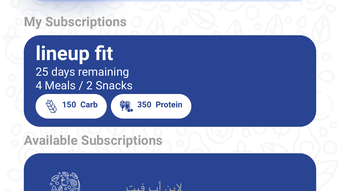
The user interface of Lineupfit is designed to be straightforward and accessible on iPhone screens. Navigation is expected to follow standard iOS patterns, with tab-based or menu-driven layouts for accessing different sections such as meals, goals, and logs. The app likely uses a minimalistic design approach, prioritizing readability and quick access to key functions.
Workflow efficiency is centered around fast logging, with the potential for shortcuts like favorite meals or recent entries. The developer did not specify resource usage details, so performance behavior in terms of CPU or RAM consumption remains unknown. However, based on general software behavior, the app is expected to operate smoothly on modern iOS devices. Stability is not independently verified, as testing has not been conducted. The app’s performance may vary depending on device age, background processes, and the volume of logged data.
Compatibility & System Requirements
Lineupfit is designed to run exclusively on iOS devices. It requires iOS 16.4 or a later version to function, which ensures compatibility with recent iPhone models. The app has a file size of 218.3 MB, which is moderate for a fitness and nutrition tool, suggesting it includes media assets and internal data structures.
Exact system requirements were not listed. This includes details on processor speed, RAM, or storage capacity beyond the OS version. The developer did not provide information on whether the app supports iPad or other Apple devices. As of now, it is confirmed to be available only on iPhone. Users should ensure their device meets the minimum iOS version to install and use the app.
Pros and Cons
Pros
- Free to download and use with no hidden costs
- Designed specifically for iPhone with native iOS integration
- Supports goal-based tracking for fitness and nutrition
- Available in English with a clear, user-friendly interface
- Regular updates indicated by version 3.8 release
Cons
- Language support limited to English only
- Compatibility restricted to iPhone and iOS 16.4 or higher
- No information on integration with Apple Health or other health platforms
- Performance and stability not independently verified
- Exact system requirements beyond OS version are not disclosed
FAQ Section
Is Lineupfit available for iPad?
The developer has not confirmed support for iPad. The app is currently designed for iPhone use only.
Can I use Lineupfit offline?
While the app’s offline capabilities were not specified, many similar tools allow basic logging without an internet connection. Users may need to sync data when online.
Is Lineupfit safe to download?
Lineupfit is published on Softonic, a trusted platform for software downloads. The app is free and does not contain known malware. Users should still exercise caution and review permissions during installation.
How often does Lineupfit receive updates?
The current version is 3.8, indicating regular maintenance. The developer has released updates since the initial launch on April 10, 2024.
What kind of license does Lineupfit have?
Lineupfit is a free software application. It does not require a license key or subscription to use.
Final Thoughts + CTA
Lineupfit presents a promising option for iPhone users focused on fitness and nutrition tracking. Its free model, goal-oriented design, and clean interface make it accessible for individuals seeking a simple yet effective tool. While it lacks advanced integrations and language support, its core functionality is well-aligned with personal health management. The app’s development activity, as shown by version 3.8, suggests ongoing improvements.
It is best suited for users who prefer a no-frills, English-only solution on iOS. For those already invested in the Apple ecosystem and looking for a straightforward way to log meals and track progress, Lineupfit offers a solid starting point. With no cost and a clear purpose, it’s worth exploring for anyone building a healthier lifestyle.
Download Lineupfit now







